

Prompt engineering helps you get better answers from AI. Loop engineering helps you build repeatable AI systems that keep working, checking, improving, and handing you better outputs over time.
That difference matters because AI is moving beyond one-off chat sessions. Instead of asking ChatGPT, Claude, Codex, or another AI tool for help once, more advanced users are building workflows where AI receives a goal, takes action, reviews the result, applies feedback, and repeats the process.
For entrepreneurs, small business owners, creators, marketers, consultants, and operators, this is the real shift. The next advantage is not just writing better prompts. It is designing better systems.
What Is Loop Engineering?
Loop engineering is the practice of designing a repeatable AI workflow where the system prompts, acts, checks, improves, and repeats until the task is complete or the output reaches an acceptable standard.
The term is still emerging. It is currently most common in AI agent and coding-agent conversations, especially around tools that can keep working toward a goal instead of waiting for a new manual prompt after every step.
Simple definition for non-technical readers
In plain English, loop engineering means you stop personally prompting the AI every time and start designing the system that prompts the AI for you.
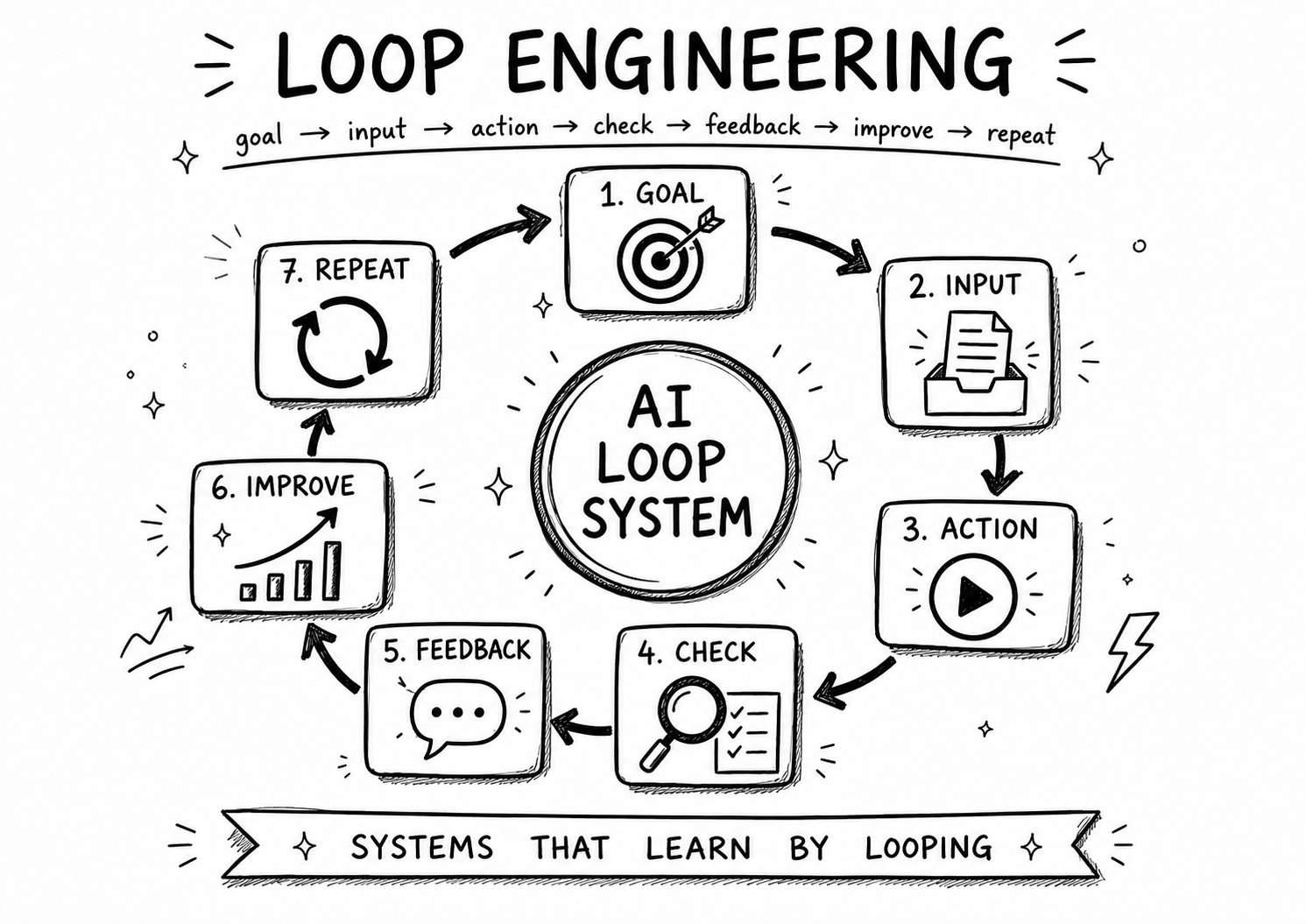
A loop usually includes:
- Goal: What the AI is trying to accomplish.
- Input: The information the AI needs to begin.
- Action: The work the AI performs.
- Check: How the output is reviewed.
- Feedback: What the AI learns from the review.
- Improvement: How the next version gets better.
- Repeat: When the process runs again.
Why the term is trending now
Loop engineering is getting attention because AI agents are becoming more capable. Instead of only answering questions, agentic systems can plan steps, use tools, check outputs, revise work, and coordinate tasks with less manual input.
That creates a new challenge. If AI can keep working, someone needs to design the loop it works inside.
How loops change the way people use AI
A normal AI chat is reactive. You type a prompt, get an answer, and decide what to do next.
A loop is more structured. You define the process once, then use it repeatedly. The AI is not just answering a question. It is helping run part of a workflow.
Prompt engineering improves the question. Loop engineering improves the system around the question.
Prompt Engineering Is Not Dead — It Is Just Not Enough
It is tempting to say “prompt engineering is dead” because loop engineering sounds newer. That is the wrong takeaway.
Prompt engineering still matters. A bad prompt inside a loop can create bad repeated outputs. A strong prompt inside a loop can make the whole workflow more useful.
Prompt engineering improves one interaction
Prompt engineering helps you ask AI for a better response. It teaches you how to give context, define the role, clarify the task, set constraints, request examples, and shape the output.
That is still valuable. If you cannot write clear prompts, it will be hard to build strong loops.
Loop engineering improves the whole workflow
Loop engineering asks a bigger question: What happens before and after the prompt?
For example, a prompt might ask AI to write a sales email. A loop might collect lead context, draft the email, check it against brand rules, improve the wording, remind you to review it, and help you track the next follow-up.
The prompt is still part of the workflow. It is just no longer the whole workflow.
Why better prompts still matter inside loops
Every loop needs instructions. Those instructions are prompts. The difference is that the prompt is now part of a repeatable system instead of a one-time request.
If you want better loops, start with stronger prompt fundamentals. The Prompt Engineering Mastery Guide is the right foundation before you start designing more advanced AI workflows.
The Difference Between a Prompt and a Loop
The easiest way to understand loop engineering is to compare it with the way most people use AI today.
| AI Use | What It Means | Business Example |
|---|---|---|
| Prompt | You ask once and get one answer. | “Give me five blog post ideas.” |
| Workflow | You repeat a process manually. | Every Monday, you ask AI for content ideas, pick one, and write it. |
| Loop | The process repeats with feedback and improvement. | Every Monday, AI reviews your content goals, suggests ideas, scores them, improves the best one, and prepares a draft brief. |
| Agentic loop | An AI agent can plan, act, check, and revise within boundaries. | An agent researches a topic, compares sources, drafts an outline, checks gaps, improves it, and sends it for human approval. |
A prompt asks once
A prompt is useful when you need quick help. You ask for an idea, a draft, a summary, a checklist, or a decision framework.
Prompts are great for one-off work. They are less useful when you keep repeating the same task every week.
A loop repeats with feedback
A loop is better when the work has a pattern. Content planning, lead follow-up, customer support review, weekly reporting, and offer improvement are all examples of repeatable business work.
The feedback step is what makes a loop powerful. Without feedback, the AI just repeats. With feedback, the system can improve.
An agentic loop can act and revise
An agentic loop goes further. The AI may be able to use tools, gather information, compare results, revise drafts, or move through multiple steps.
That does not mean you remove human review. It means the AI can do more of the preparation before you make the final call.
Why AI Agents Make Loop Engineering More Important
AI agents are most useful when they are placed inside a clear system. Without boundaries, an agent can drift, waste time, or produce work that looks complete but misses the goal.
Loop engineering gives agents structure.
Agents can take actions
A chat model usually responds. An agent may be able to take steps. That could include searching, drafting, editing, organizing, comparing, or using connected tools where available.
The more an AI system can do, the more important it becomes to define the goal, constraints, stopping point, and approval step.
Agents can use tools
Tool use makes loops more powerful. For example, an AI system might help review documents, summarize customer feedback, check a content calendar, or prepare a weekly report.
But tool use also adds risk. If the agent is using the wrong information, checking the wrong source, or following unclear instructions, the loop can repeat mistakes.
Agents need boundaries and review points
A good agentic loop should answer these questions:
- What is the agent allowed to do?
- What information can it use?
- What should it avoid?
- How does it check its work?
- When does a human approve the result?
- When should the loop stop?
This is where AI agents become useful for business workflows, not just technical experiments. The AI Agents Mastery Guide can help you understand how to think about agents, workflows, approval points, and business use cases.
Business Examples of Loop Engineering
You do not need to be a developer to use loop engineering. You can apply the same thinking to everyday business workflows.
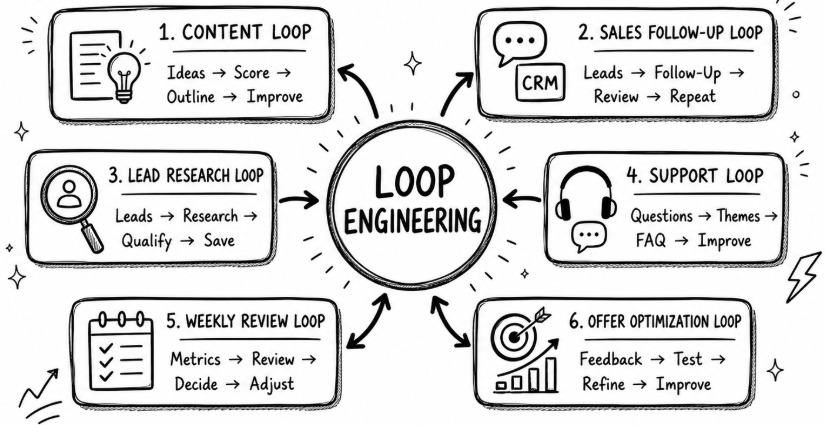
Content improvement loop
A content loop can help you move from random publishing to a repeatable content system.
Example loop:
- Review audience questions and business goals.
- Generate content ideas.
- Score ideas by relevance, search potential, and sales fit.
- Choose the strongest idea.
- Create an outline.
- Check for missing examples, weak sections, or unclear positioning.
- Improve the outline before drafting.
This connects naturally to AI visibility and authority building. For deeper content strategy, see content that earns AI citations.
Sales follow-up loop
A sales loop helps prevent warm leads from going cold.
Example loop:
- Review open leads.
- Identify who needs a follow-up.
- Draft a personalized message.
- Check the tone for clarity and usefulness.
- Suggest the next action.
- Repeat daily or twice per week.
The goal is not to let AI sell without you. The goal is to make sure follow-up happens consistently.
Lead research loop
A lead research loop can help consultants, agencies, and service businesses prepare for outreach.
Example loop:
- Choose a target lead or account.
- Research the business using approved sources.
- Identify likely pain points.
- Suggest a relevant offer angle.
- Draft an outreach message.
- Check for unsupported claims or generic wording.
- Improve before sending.
Customer support loop
A customer support loop can help small teams spot repeated issues.
Example loop:
- Review recent customer questions.
- Group them by theme.
- Draft improved support replies.
- Identify missing FAQ content.
- Suggest one process improvement.
- Repeat weekly.
Weekly business review loop
A weekly review loop helps business owners turn scattered updates into better decisions.
Example loop:
- Review goals, tasks, sales activity, content output, and client delivery.
- Identify what moved forward.
- Identify what stalled.
- Suggest next week’s top priorities.
- Flag decisions that need human judgment.
- Repeat every Friday or Monday.
This is closely related to recurring AI workflows like turn ChatGPT into a daily business assistant.
Offer optimization loop
An offer loop can help you improve a product, service, coaching package, or consulting offer over time.
Example loop:
- Review customer questions and objections.
- Compare them to your current offer page or pitch.
- Identify unclear promises.
- Suggest stronger positioning.
- Draft improved copy.
- Review for accuracy and overpromising.
- Repeat monthly.
Ecommerce research loop
Ecommerce owners can use loops for product research, review analysis, support themes, and product page improvements.
Example loop:
- Review customer reviews or questions.
- Find repeated objections.
- Suggest product page improvements.
- Draft clearer FAQ answers.
- Identify content or email ideas.
- Repeat weekly.
For tool ideas in this space, see AI tools for ecommerce businesses.
How to Build Your First AI Loop
Your first loop should be simple. Do not try to automate your entire business. Pick one repeatable workflow that already happens every week.
Use this framework:
Goal → Input → Action → Check → Feedback → Improve → Repeat
1. Pick one repeatable workflow
Choose something that happens often enough to benefit from structure. Good first loops include content planning, weekly review, lead follow-up, customer support summaries, proposal drafting, or meeting preparation.
2. Define the goal
The goal should be specific. “Help with marketing” is too broad. “Generate and score five content ideas for my coaching audience every Monday” is much better.
3. Give the AI the right inputs
Inputs might include your audience, offer, brand voice, current priorities, customer questions, sales notes, product details, or previous results.
Weak inputs create weak loops. Strong inputs give the AI something useful to work with.
4. Add a review step
The review step tells the AI how to judge its own work. For example:
- Check whether the recommendation matches the target audience.
- Check whether the draft sounds too generic.
- Check whether the idea supports a business goal.
- Check whether the response includes unsupported claims.
5. Add improvement criteria
Tell the AI what “better” means. Better could mean clearer, shorter, more specific, more practical, more persuasive, more accurate, or more aligned with your brand.
6. Decide when the human approves
Not every loop should run without review. For sales messages, client work, financial decisions, legal content, hiring decisions, and sensitive customer issues, keep a human approval step.
Loop engineering is not about removing judgment. It is about using AI to prepare better work before judgment is needed.
Move from random AI use to repeatable AI systems
Better prompts are the foundation. Better loops are the system. Start with the Prompt Engineering Mastery Guide to write stronger instructions, then use the AI Agents Mastery Guide to build agent-ready workflows with goals, feedback, review points, and repeatable business outcomes.
Explore AI ProductsWhat Can Go Wrong With Bad Loops
Loop engineering is powerful, but it is not magic. A poorly designed loop can repeat mistakes faster than a person would.
Bad inputs create bad repeated outputs
If your loop starts with outdated, incomplete, or vague information, the AI will keep building on weak context. Before you blame the model, check the inputs.
Loops can waste time and usage
Agentic systems can consume more resources than a simple prompt because they may run multiple steps, checks, revisions, or tool calls. Use loops where repetition and improvement are worth it.
Agents can drift from the goal
An agent may start with the right task and slowly move away from the original goal. Clear instructions, stopping rules, and review criteria help prevent drift.
Human review still matters
Do not fully automate workflows where accuracy, privacy, trust, or judgment are critical. AI can help draft, organize, summarize, and review. You still need approval points for important decisions.
Not every task should be automated
Some tasks are too rare, too sensitive, or too judgment-heavy to turn into a loop. A simple prompt or manual process may be better.
The Future Is Not Better Prompts — It Is Better Systems
The future of AI work is not just asking better questions once. It is building repeatable systems that help your business work better every week.
Prompt engineering is still the foundation. Loop engineering is the next layer. Agents make that layer more important because they can act, check, revise, and continue inside the boundaries you design.
For entrepreneurs and consultants, this creates a major opportunity. Businesses will need people who can turn AI from a chat box into a workflow. That is also why AI implementation is becoming a real business skill, as explained in AI consulting and implementation opportunity.
Start small. Pick one recurring workflow. Define the goal. Give the AI better inputs. Add a review step. Improve the output. Repeat.
That is the shift from prompt engineering to loop engineering: not replacing prompts, but turning them into systems that keep improving.
Verify tool features, pricing, examples, and availability before publishing.