Claude Cowork setup · 2 hours, once
Claude Forgets You Every Single Morning.
New chat, blank slate. Every correction you made yesterday is gone, so you explain your voice, your audience and your rules again. And again.
Tone Twin ends it in one sitting. Three files in one folder, and Claude reads all of them before it writes a single word.
- One-time payment
- Lifetime updates
- 7-day refund
✕ Whose post is this? Could be anyone’s. That’s the problem.
I started it 14 months ago to stop answering the same 5 AI questions in my DMs.
It still runs on one rule: post something a person can use today, or don’t post.
That’s the whole strategy. 👇
✓ Right milestone. Right numbers. Right voice. First draft.
This is the actual test from Module 3. You run it yourself to prove the setup worked.
Sometimes The Prompt Was Longer Than The Post.
The problem
I publish constantly. Posts, captions, product copy, community updates.
Claude could give me something technically correct in seconds.
It rarely sounded like me.
Generic hook. Structure too polished. Phrases I’d never use. It explained too much and flattened the energy that made the original work.
So I’d ask for a post, get a draft, and start the loop:
- Make it less generic.
- Don’t start like that.
- Shorten the sentences.
- Remove the AI language.
- That still doesn’t sound like me.
Several rounds. Every time.
Claude was generating words. It wasn’t removing the work. I was still translating every draft back into my own voice before anything could go out. At 120,000 members, publishing every day, that isn’t a small tax. That’s most of the afternoon.
What I tried
So I made the prompts longer. Who I am. What Success Steps does. The audience. The tone. The structure. The phrases to avoid.
Sometimes the prompt was longer than the post I was asking for.
Then I saved them in documents. One file for my tone. One for my audience. One for the phrases I hated. Now I had to find the right file, paste it, update it, and still fix the output afterward.
Nothing worked together.
Every new chat started from zero.
The insight
I’m an engineer. When something breaks this consistently, the problem is the structure, not the effort.
I’d learned that once already, building Success Steps. More tactics never fixed anything. A system did.
My prompts didn’t need to be longer.
Prompts were the wrong place to keep something Claude needed every single time.
So I moved it out of the chat and into files.
The first test
The first test was simple. I asked Claude for an Instagram caption announcing a milestone. I didn’t say which milestone, didn’t re-explain my audience, didn’t paste a tone prompt. I told it to use what it already knew and not to ask me anything.
It picked the right milestone. It knew why that milestone mattered. It structured the caption the way I would have, and skipped the phrases I normally strip out by hand.
That’s when I stopped.
It wasn’t perfect. It still needed polish.
But for the first time I was editing a draft that already sounded like me, instead of rewriting a generic one into my voice.
I didn’t need a better prompt. I needed Claude to start every task already knowing who I was.
- Longer prompts Typed again in every new chat
- Saved documents Found, pasted and updated by hand
- One folder Claude reads by itself Read before every task, automatically
That became Tone Twin.
Stop Prompting Claude. Start Operating It.
Prompting means starting from zero every time. Operating means Claude already has everything it needs before you ask for anything.
Prompting: what you do now
You are the context window
- 400 words of setup before the actual request
- Output arrives beige, correct and anonymous
- You rewrite it 12 times to sound like yourself
- Corrections live in the chat and die with it
- Tomorrow you type the whole thing out again
Operating: after Tone Twin
Your files are the context
- One line: the task and what success looks like
- First draft already sounds like you wrote it
- One command makes Claude audit its own AI tells
- A correction written once applies forever
- Every new session opens already knowing you
Every time you type the same context twice, that context belongs in a file, not a chat.
One Folder. Three Small Files.
No app, no subscription, no plugin. Plain text files on your own computer that Claude reads automatically. Click through them.
Claude reads every file in ABOUT ME before every task, automatically. It only opens the other two when you point at them.
about-me.md
Who you are# ABOUT ME
## Who I am
I run a 120k-member AI community. I sell digital products to solo operators who publish weekly.
## My quality bar
Real numbers over adjectives. If a line can be cut, cut it.
## My voice tells
Short line. Then a longer one that earns its length.
Under 2,000 words. Claude interviews you and writes it for you.
anti-ai-slop-style.md
What you reject# WRITING RULES
## Banned vocabulary
delve · leverage · unlock · seamless · elevate · game-changer
## The contrast trap (hard ban)
✗ "This isn't X. It's Y."
✓ Just state the positive claim.
## Formatting
No em dashes. Short paragraphs. Digits for numbers.
Arrives pre-written. Add your own icks as you spot them.
my-work.md
Where you’re going# MY WORK
## Goals
Newsletter 4.5k → 10k. Grow product income. Facebook stays priority one.
## Focus right now
One flagship launch this quarter. Nothing else ships.
## Saying no to
Short-form video. Client work. New platforms.
Under 600 words. This is what makes Claude decide like you.
-
They’re yours, on your machine
Plain
.mdtext files in a folder you create. Nothing is stored in a product you have to keep paying for. -
Claude reads them without being asked
One block of Global Instructions, pasted once, tells Cowork to open
ABOUT ME/before every task. -
They move with you
Switch to ChatGPT, Gemini or Grok and paste the same three files in. Your voice isn’t locked to one platform.
-
They’re delegatable
Hire a VA or a ghostwriter and hand them the same folder. Now they can write as you too.
Two Hours Once. Then It Just Runs.
Work through the phases in order your first time. Each one sets up the next, and you can split them across as many sittings as you like.
Get the pieces in place 15 min
No content yet. This phase is pure setup and it’s mostly clicking.
- Install the Claude desktop app. Cowork doesn’t exist in the browser
- Pick the right model, and know when to drop down to a cheaper one
- Create the folder and its three subfolders
- Paste the Global Instructions block. This is the line that makes it all automatic
Ends with a 6-point checklist, so you know the foundation is right before you go on.
Let Claude interview you 60–90 min
The part that actually matters. You paste one prompt and answer questions about your own work.
- 15 to 20 questions covering how you work, your quality bar, what makes you cringe
- Claude pushes back when your answer is vague. That’s built into the prompt
- It captures your actual phrases as you talk and puts them in the file
- Then it writes
about-me.mdandmy-work.mdand saves them for you
The one part actually worth doing properly. Vague answers produce a vague twin.
Run the test 5 min
Close everything, open a fresh session, and give Claude one prompt with no context at all.
- Claude picks a milestone based on what it now knows about you
- Four things to check in the output, listed for you
- If it passes, you’re operating. If it doesn’t, a 6-point diagnostic tells you exactly why
This is the moment you watch it work.
Now you just work setup complete
Everything after this is optional sharpening. The setup itself is finished and it doesn’t need redoing.
- Two free apps that make it faster to use and easier to maintain
- The habit that keeps it accurate: update files, never correct in chat
- A 30-minute review every 3 months so your twin ages with you
None of this is required. The setup already works. This is just how you keep it sharp.
How you’ll use it
Four Lines You’ll Type Every Day.
Once the files exist, prompting stops being a skill you practise. It becomes four short commands.
The 1-line formula
Ask for the work
That’s the whole prompt. Claude already knows your voice, your audience, your formatting rules and what you’d never write.
The alignment upgrade
When you’re not sure yet
Claude comes back with a multiple-choice form instead of a guess. This is what kills the 5-rewrite loop.
The safety net
Make it audit itself
Claude re-reads your rules, finds the AI tells it just produced, and rewrites them. An AI catching its own patterns.
The library builder
Keep what worked
Every piece you love becomes a reusable skeleton. Your best work turns into a library without any admin.
What’s inside
Seven Modules, In Order.
Built as toggles in Notion so you can skim it or work through it. Every prompt is a copy-paste block, every module ends in a checklist.
-
01
10 min
Why this is the foundation
The shift from prompting to operating, what you’re actually building, and what changes the day after.
-
02
15 min
The quick setup
Desktop app, model choice, folder structure, and the Global Instructions block ready to paste.
-
03
60–90 min
Your three voice files The heart of it
The full interview prompts, the complete anti-slop style file, and the test that proves it worked.
-
04
10 min
Power tools
Two free apps: one makes answering the interview 4x faster, one makes editing your files painless.
-
05
The payoff
How to actually use it
The four daily commands, the template library, and five habits that stop you hitting usage limits.
-
06
Ongoing
Keep it alive
Update files not chats, the 3-month review, and the exact wording that makes a rule stick permanently.
-
Advanced
Build your own Skills
Turn the tasks you repeat into slash commands. Type
/linkedinand Claude knows the structure and your voice.
Plus a full troubleshooting diagnostic: 6 checks and the fix prompts for when something feels off.
Built To Be Used, Not Read.
Open it next to the Claude app and work down the page. Duplicate it to your own Notion if you want the checkboxes to tick.
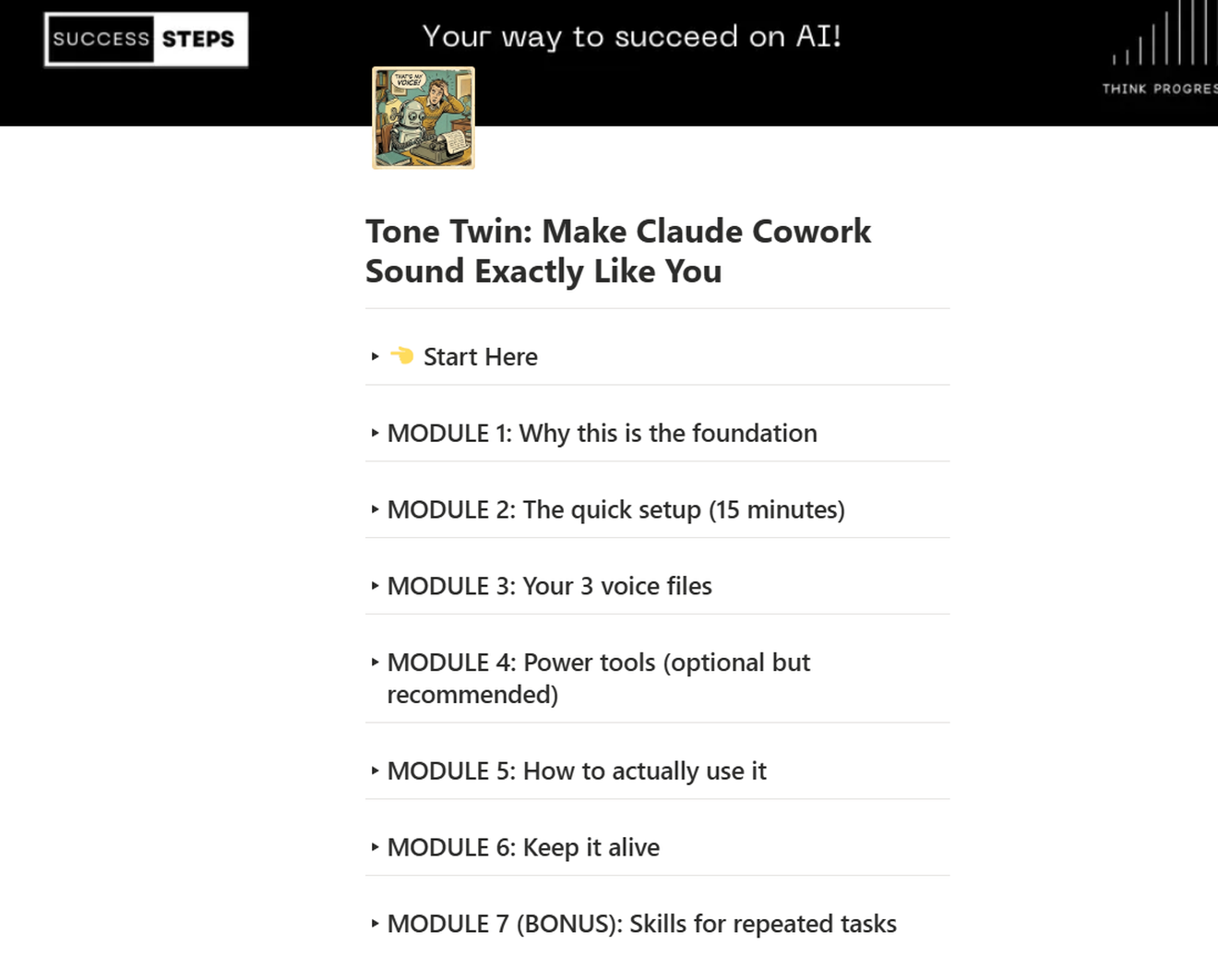
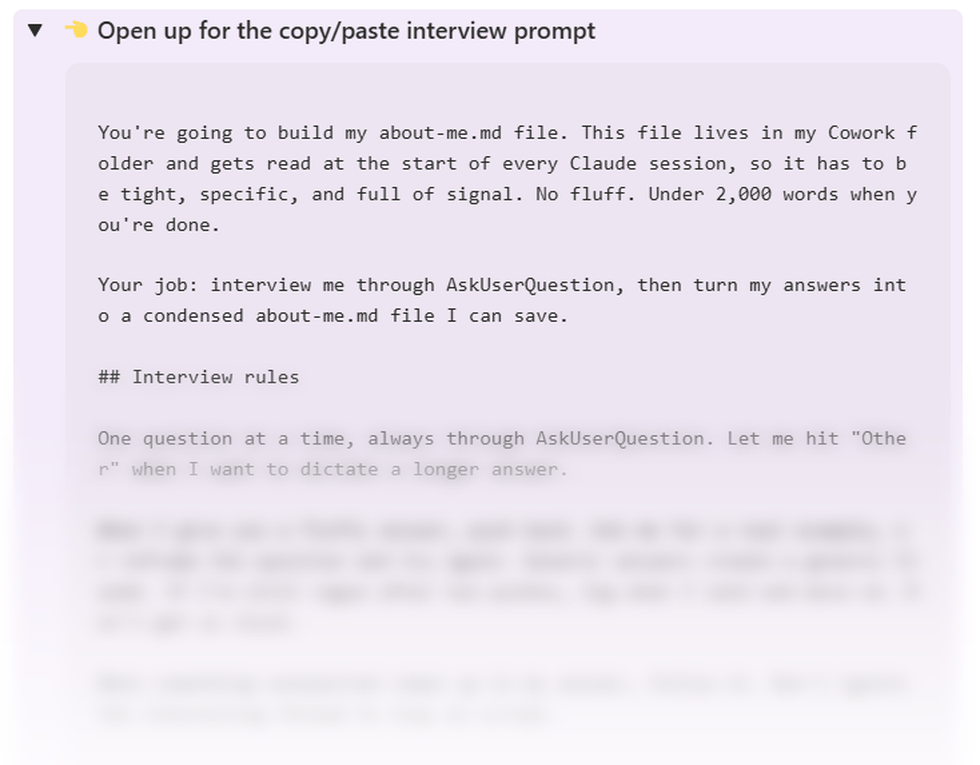
- Toggle sections so nothing overwhelms you at once
- Every prompt in a copy-paste block, ready to run
- A checklist at the end of each module so nothing gets skipped
- Screenshots of every screen you’ll be clicking through
- Lifetime access, and every update as Claude changes
For people who publish every week and are done sounding like everybody else’s AI.

Launch offer
Get Tone Twin Set Up Before Your Next Post
Build the three files tonight. Every Claude session from tomorrow morning starts out already sounding like you.
One-time payment Instant access Lifetime updates
Get Instant Access for $27 Delivered instantly via Notion
Everything you get
- The full 7-module setup guide
- The about-me.md interview prompt
- The my-work.md interview prompt
- The complete anti-AI-slop style file
- Global Instructions, ready to paste
- The four daily commands
- Token habits that stop lockouts
- Bonus: build your own /slash Skills
- The 6-point troubleshooting diagnostic
- Lifetime updates as Claude changes
The $20 Claude Pro plan is all you need. You’ll run this in the Claude desktop app on Mac, Windows or Linux, since Cowork doesn’t exist in the browser or on mobile. The plan is paid to Anthropic, not to me.
Used By People Who Publish Every Week.
Creators, founders, agencies and marketers running Tone Twin so their Claude drafts sound like them from the first line.
- ★★★★★
“Before Tone Twin, AI always sounded generic. Now Claude writes course lessons and emails in my own voice, which makes creating new content dramatically faster.”
 Madeleine OuelletteOnline Course Creator
 - ★★★★★
“My editing time dropped almost immediately.”
 Carissa LynnFreelance Copywriter
 - ★★★★★
“I’ve spent years developing my newsletter voice. Tone Twin helped Claude learn those patterns almost perfectly. The drafts now feel like something I would’ve written myself, which makes publishing consistently so much easier.”
 Robert AldrichNewsletter Writer & Creator
 - ★★★★★
“One of the smartest AI purchases we’ve made.”
 Stephen CieplyAgency Owner
 - ★★★★★
“Tone Twin finally made Claude sound like me instead of another AI. It has completely changed how I create client content.”
 Amanda PowellBusiness Coach & Consultant
 - ★★★★★
“As a startup founder, I don’t have time to rewrite every AI draft. Tone Twin changed that completely. Claude now produces investor updates, customer emails, and social posts that genuinely sound like they came directly from me.”
 Maria PechtelStartup Founder
 - ★★★★★
“We now use Tone Twin across our entire agency.”
 Devin MedinaContent Marketing Agency Owner
 - ★★★★★
“Tone Twin made our product descriptions and emails feel much more authentic while cutting our writing time in half.”
 Steve MillerE-commerce Founder
 - ★★★★★
“As a social media manager, consistency is everything. Tone Twin lets me train Claude to write naturally in my own style, giving me stronger first drafts and reducing editing time across every client account.”
 Paul MillsSocial Media Manager
 - ★★★★★
“Tone Twin transformed Claude into a true extension of my own writing process.”
 Jessica AndersonMarketing Consultant
 - ★★★★★
“I’ve tried dozens of AI tools, but Tone Twin is the first one that captured my personality instead of producing generic content.”
 Sarah EatherlyContent Creator
 - ★★★★★
“I recommend Tone Twin to clients because it helps AI sound authentic instead of robotic.”
 Debbie DiazPersonal Brand Coach
Questions Before You Build Your Tone Twin?
No. You create a folder, add three subfolders, and paste one block of text into a settings box. Claude writes the three files itself by interviewing you. You only answer questions about your own work.
The Claude desktop app on Mac, Windows or Linux, and a Claude Pro plan at $20/month paid directly to Anthropic. Cowork only exists in the desktop app. The $20 plan is enough, so you don’t need the higher tiers to run this.
About two hours, and you can split it. Setup is 15 minutes. The interview that builds your voice files is 60 to 90 minutes, because that’s the part worth doing properly. Everything after that is optional.
They stack. Slop Killer is about what to remove: the banned words, the fake-insight patterns, each model’s tells. Tone Twin is about what to install: the folder, the files, and the setup that makes Claude write as you by default. Tone Twin ships with its own starter anti-slop file, so it works on its own.
You can, once per chat, every chat, forever, and you’ll still be guessing at what to include. The files make it permanent and complete. Claude reads all three before every task without being asked, and a correction you write today still applies next month.
The automatic part is Cowork specific. The three files are plain text, so you can paste them into ChatGPT, Gemini or Grok and get most of the benefit there too. Your voice profile isn’t locked to one platform.
Module 6 covers exactly that. You edit the file instead of correcting Claude in a chat, and there’s a 30-minute review to run every three months. A voice file that’s 18 months old stops sounding like you.
Email support within 7 days for a full refund. Run Module 2 and the test in Module 3 first. That’s about 20 minutes and it’s usually enough to know.
You’re Going To Explain Yourself To Claude Tonight Anyway. Do It Once Instead Of Forever.
Two hours now. Every session after it opens already knowing who you are.
Get Your Tone TwinOne-time paymentInstant Notion accessLifetime updates
Brand new to Claude? Start with the free Claude Mastery Guide and come back once you’re set up.